I wanted to see what my AI agents could reach
I wanted a map of what could happen if one of my agents was tricked or taken over.
Which files could it affect? Could private information leave my machine? What happens when a skill that reads information sits alongside a tool that can send it somewhere else?
That became the Blast radius tab in Agent Estate, the dashboard I use to inspect my agent setup.
The first version gave me findings and explanations. Then I looked at it and wanted another way in. There was useful detail, but it was a wall of text I had to sit and comb through.
I asked for the agent in the middle, with the things around it: files, instructions, tools, connections to the internet. I wanted to see how those pieces relate, while keeping the evidence underneath.
The combination is what I wanted to understand
A skill describes a workflow. A tool lets the agent act on data or use a service. Looking at either in isolation leaves an important question unanswered: what could they do together?
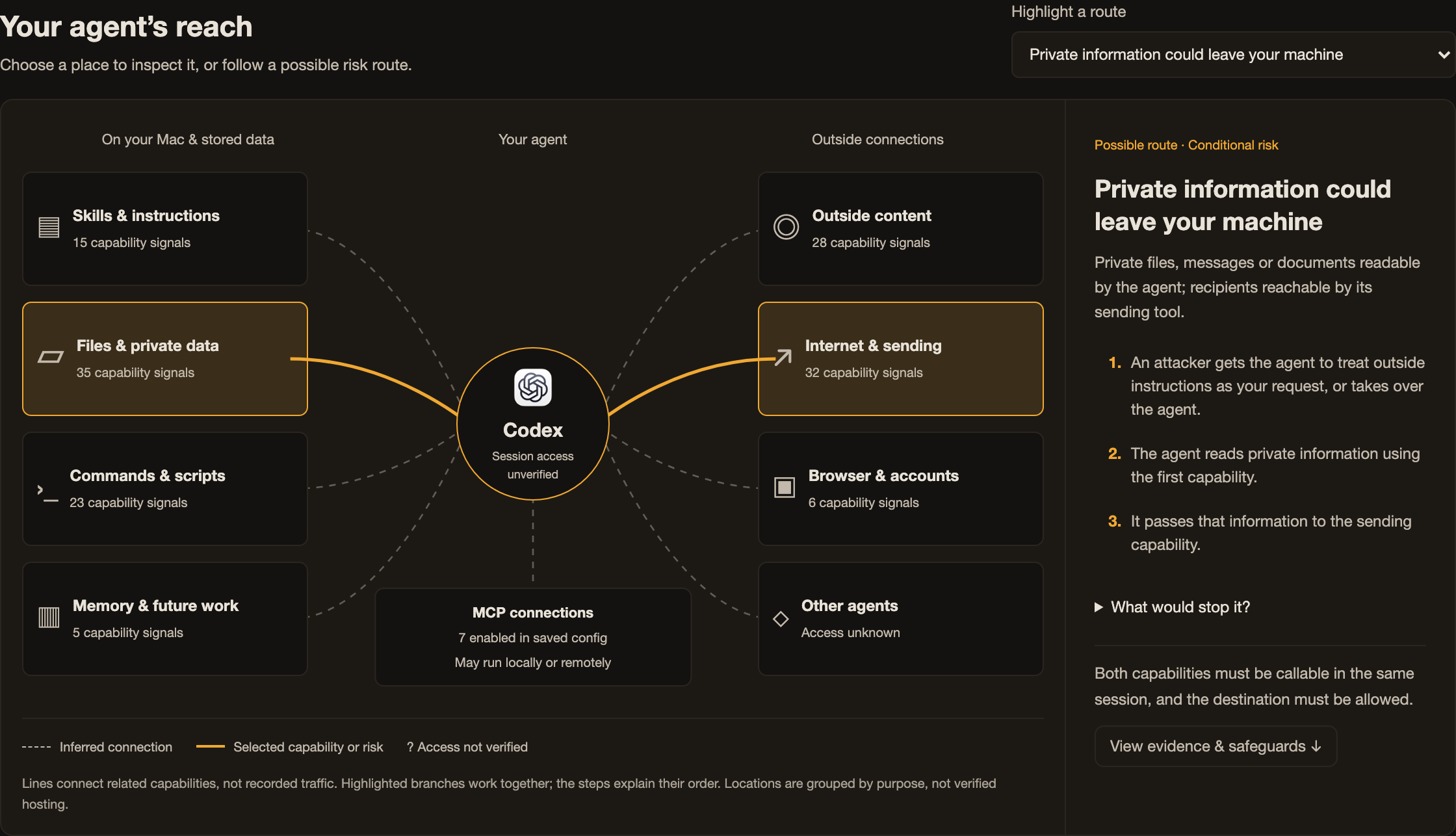
Take a workflow that reads private information and another that sends information outside. If both are available in the same session, and the destination is allowed, that combination could let a compromised agent move private data out.
Those conditions matter. A reference to reading a file does not prove that an agent can read every file. A sending tool does not prove that every destination is reachable.
I wanted the dashboard to show the possible route, explain what would have to be true, and let me inspect why it appeared.
The map gives me somewhere to start
The selected agent sits in the centre. Its logo shows which application I am looking at.
Around it are groups for skills and instructions, files and private data, commands, remembered information, outside content, internet requests, browser accounts, and other agents. Connections to tool servers [MCPs] sit below the agent. They may run locally or remotely, so I did not want the map to imply that they all live on the internet.
I can choose a possible risk and see the relevant branches highlighted. The panel beside the map explains the steps, the conditions, and a way to interrupt the route.
The scan suggests how capabilities relate to each other. The lines show those suggested connections. They are not a recording of network traffic, and the layout is not a verified diagram of where every service runs.
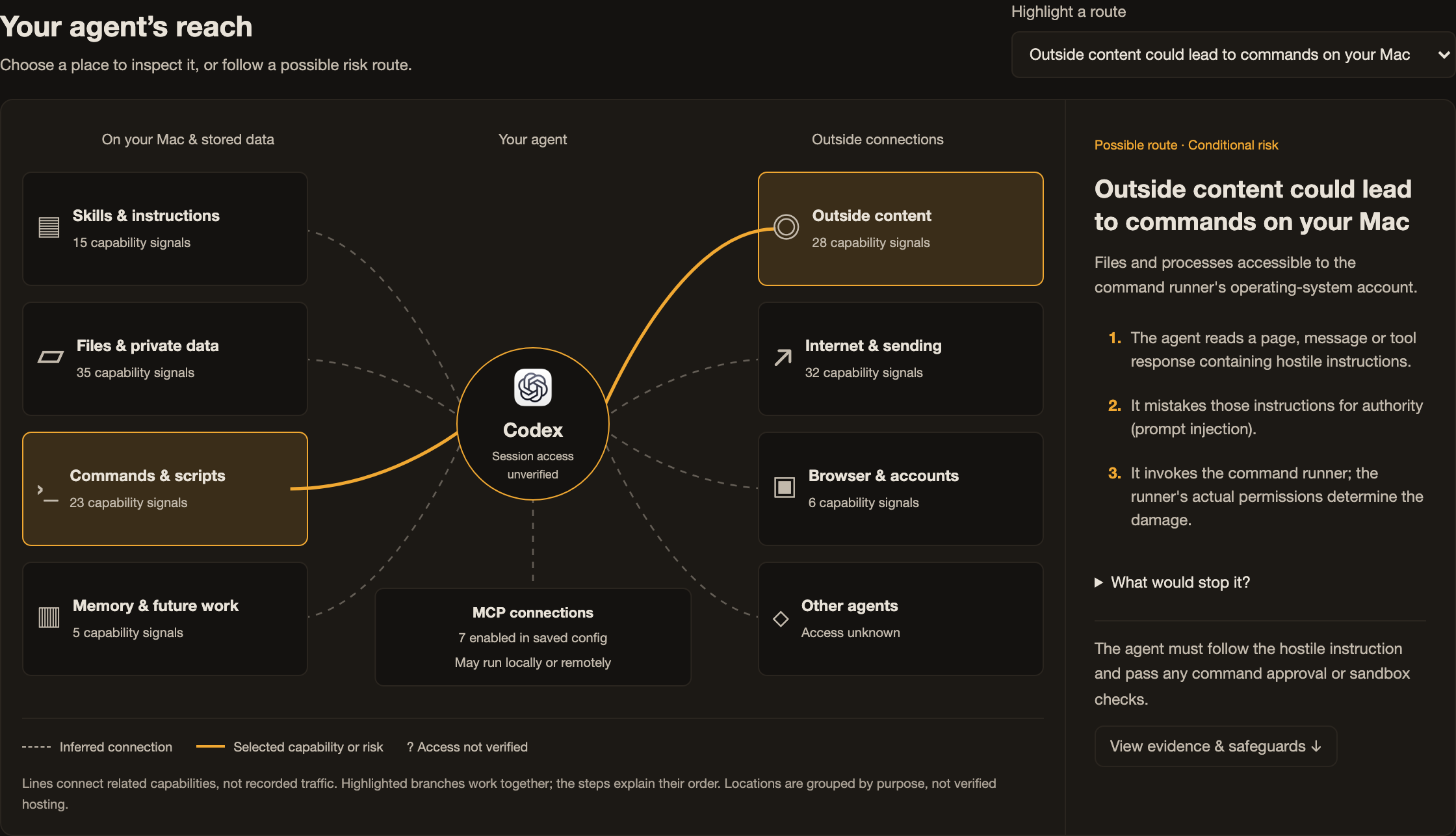
For example, one route asks what could happen if an agent reads hostile instructions in a page or message and then runs a command. Treating outside content as an instruction [prompt injection] is the concern. Whether the command succeeds still depends on what the command tool permits.
Selecting a box lets me inspect supporting evidence. A link takes me back to the fuller finding below. The map gives me an overview; the existing assessment keeps the detail available when I need it.
Research changed what belonged in the assessment
One addition was a route involving an ordinary web request. Private data can be placed inside a requested address or a search argument. In that situation, making the request can disclose the data even if the tool is described as reading rather than sending. Johann Rehberger demonstrated a related route in historical Antigravity research. That does not establish that my installed version is vulnerable. Read the original demonstration.
Another addition was the text supplied by tools themselves. Invariant demonstrated instructions hidden in tool descriptions influencing an agent's use of other tools. That gave me another boundary to consider: who supplied the description, and what other access is available to the agent reading it? Read the tool-description research.
The MCP specification also says clients must treat tool annotations as untrusted unless they come from trusted servers. A tool's own description of its behaviour needs to be distinguished from independently checked behaviour. Read the MCP tools specification.
The assessment also includes candidate routes involving changes to future instructions, remembered information, handoffs between agents, and repeated work. Each route has its own conditions rather than being presented as an inevitable outcome.
What the dashboard can establish
This version reads deployed skill text, local scripts, saved configuration, and cached tool descriptions. It looks for signs of what an agent may be able to do. It then shows how those abilities could combine.
It does not try to perform those actions. It does not demonstrate a successful compromise, verify every account permission, or establish which tools are callable together in the current session. Text matching can miss an ability. It can also suggest access that the agent does not have. The dashboard shows these limits.
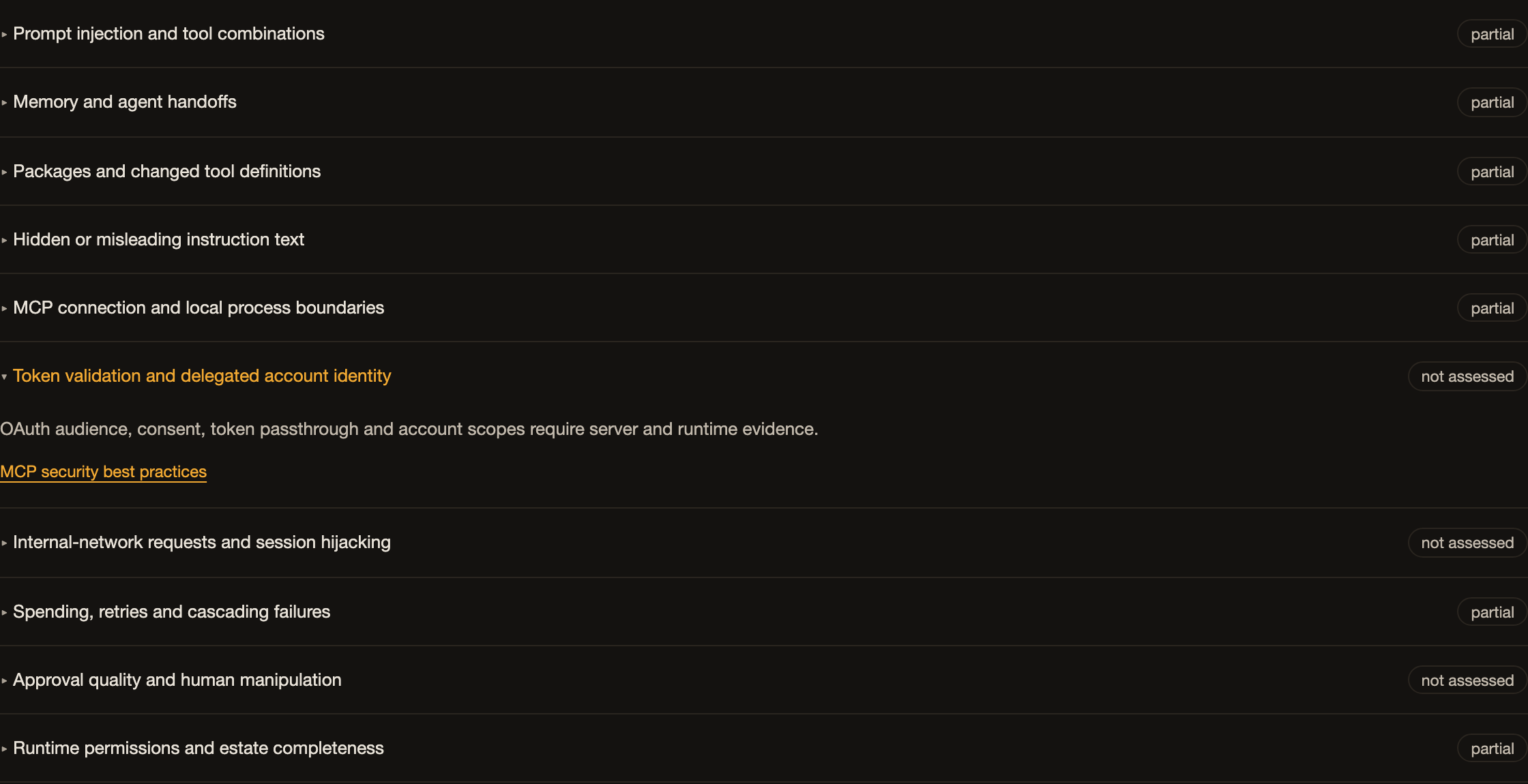
Even the counts need that distinction. A count of possible routes is not a count of confirmed vulnerabilities. Comparing those counts across agents is not a security ranking.
That is why I kept the evidence and the unknowns alongside the map. If the picture makes a connection look certain, the explanation needs to say what has actually been observed.
The question I want to ask before adding more access
When I add a skill, a tool, or a connection, I want to understand what new combinations it creates with what is already there.
The map gives me a way to explore that question. I can start with a possible consequence, see which capabilities contribute to it, and inspect the conditions that would allow or stop it.
This is the current implementation in my private Agent Estate setup. The public version does not include this feature yet.
If you use agents with access to files and connected services, which combination would you want to understand first?